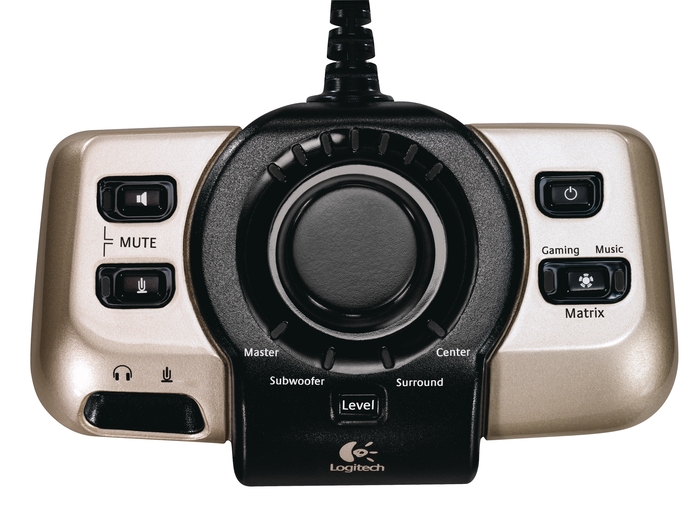
|
Phanom
Anmeldungsdatum:
28. April 2013
Beiträge: 222
|
Hallo Gurus ich hab Ubuntu Xenial installiert nun bin ich an den Feinheiden dran zu ändern leider stoße ich bei mein Sound auf des erste Problem. Ich benutze seit 10.04 alle LTS Versionen von Ubuntu zwischendurch Debian zum rumprobieren seit dem Kernel 4.x wird meine Soundkarte nicht mehr richtig erkannt möchte gern wieder 5.1 dolby als Ausgabe. aplay -L 1
2
3
4
5
6
7
8
9
10
11
12
13
14
15
16
17
18
19
20
21
22
23
24
25
26
27
28
29
30
31
32
33
34
35
36
37
38
39
40
41
42
43
44
45
46
47
48
49
50
51
52
53
54
55
56
57
58
59
60
61
62
63
64
65
66
67
68
69
70
71
72
73
74
75
76
77
78
79
80
81
82
83
84
85 | aplay -L
default
Playback/recording through the PulseAudio sound server
null
Discard all samples (playback) or generate zero samples (capture)
pulse
PulseAudio Sound Server
sysdefault:CARD=SB
HDA ATI SB, AD1988B Analog
Default Audio Device
front:CARD=SB,DEV=0
HDA ATI SB, AD1988B Analog
Front speakers
surround21:CARD=SB,DEV=0
HDA ATI SB, AD1988B Analog
2.1 Surround output to Front and Subwoofer speakers
surround40:CARD=SB,DEV=0
HDA ATI SB, AD1988B Analog
4.0 Surround output to Front and Rear speakers
surround41:CARD=SB,DEV=0
HDA ATI SB, AD1988B Analog
4.1 Surround output to Front, Rear and Subwoofer speakers
surround50:CARD=SB,DEV=0
HDA ATI SB, AD1988B Analog
5.0 Surround output to Front, Center and Rear speakers
surround51:CARD=SB,DEV=0
HDA ATI SB, AD1988B Analog
5.1 Surround output to Front, Center, Rear and Subwoofer speakers
surround71:CARD=SB,DEV=0
HDA ATI SB, AD1988B Analog
7.1 Surround output to Front, Center, Side, Rear and Woofer speakers
iec958:CARD=SB,DEV=0
HDA ATI SB, AD1988B Digital
IEC958 (S/PDIF) Digital Audio Output
dmix:CARD=SB,DEV=0
HDA ATI SB, AD1988B Analog
Direct sample mixing device
dmix:CARD=SB,DEV=1
HDA ATI SB, AD1988B Digital
Direct sample mixing device
dmix:CARD=SB,DEV=2
HDA ATI SB, AD1988B Alt Analog
Direct sample mixing device
dsnoop:CARD=SB,DEV=0
HDA ATI SB, AD1988B Analog
Direct sample snooping device
dsnoop:CARD=SB,DEV=1
HDA ATI SB, AD1988B Digital
Direct sample snooping device
dsnoop:CARD=SB,DEV=2
HDA ATI SB, AD1988B Alt Analog
Direct sample snooping device
hw:CARD=SB,DEV=0
HDA ATI SB, AD1988B Analog
Direct hardware device without any conversions
hw:CARD=SB,DEV=1
HDA ATI SB, AD1988B Digital
Direct hardware device without any conversions
hw:CARD=SB,DEV=2
HDA ATI SB, AD1988B Alt Analog
Direct hardware device without any conversions
plughw:CARD=SB,DEV=0
HDA ATI SB, AD1988B Analog
Hardware device with all software conversions
plughw:CARD=SB,DEV=1
HDA ATI SB, AD1988B Digital
Hardware device with all software conversions
plughw:CARD=SB,DEV=2
HDA ATI SB, AD1988B Alt Analog
Hardware device with all software conversions
hdmi:CARD=HDMI,DEV=0
HDA ATI HDMI, HDMI 0
HDMI Audio Output
dmix:CARD=HDMI,DEV=3
HDA ATI HDMI, HDMI 0
Direct sample mixing device
dsnoop:CARD=HDMI,DEV=3
HDA ATI HDMI, HDMI 0
Direct sample snooping device
hw:CARD=HDMI,DEV=3
HDA ATI HDMI, HDMI 0
Direct hardware device without any conversions
plughw:CARD=HDMI,DEV=3
HDA ATI HDMI, HDMI 0
Hardware device with all software conversions
|
cat /proc/asound/cards | cat /proc/asound/cards
0 [SB ]: HDA-Intel - HDA ATI SB
HDA ATI SB at 0xf97f4000 irq 16
1 [HDMI ]: HDA-Intel - HDA ATI HDMI
HDA ATI HDMI at 0xf98bc000 irq 33
2 [CX8811 ]: CX88x - Conexant CX8811
Conexant CX8811 at 0xfc000000
|
wenn ich bei Alsamixer die Ausgänge Unmute und einstelle wird es beim nächsten Start oder wenn ich auf den Pulslautstägeregler gehe wider auf Kopfhörer gestellt Alsa und Pulse Seiten von Ubuntuusers habe ich jetzt fast alle durchgearbeitet. Speaker test
| speaker-test -c6 -D surround51
speaker-test 1.1.0
Wiedergabe-Gerät ist surround51
Stream-Parameter sind 48000 Hz, S16_LE, 6 Kanäle
Verwende 16 Oktaven rosa Rauschen
Fehler beim Öffnen des Gerätes: -16, Das Gerät oder die Ressource ist belegt
|
aplay spielt ton überall ab | aplay /usr/share/sounds/alsa/Front_Center.wav
|
bin mit mein Latein am ende bitte um hilfe der verdacht mit dem Kernel ist mir gekommen da ich bei Debian nach einen Kernel-update das gleiche Phänomen hatte. und ich irgend wann in Terminal 2 mal die Soundkarte stehen hatte einmal mit dem Zusatz alt. Danke im Voraus Phanom
- Bilder
|
|
Kellerkind_2009

Anmeldungsdatum:
26. November 2009
Beiträge: 19617
|
Hi.Welche der 3 Soundkarten verwendest du denn als 5.1 ?
Zeige mal die Ausgabe von head -n 1 /proc/asound/card0/codec#* Ich vermute mal 0 [SB]: HDA-Intel - HDA ATI SB
|
|
Phanom
(Themenstarter)
Anmeldungsdatum:
28. April 2013
Beiträge: 222
|
hallo Kellerkind | head -n 1 /proc/asound/card0/codec#*
Codec: Analog Devices AD1988B
|
ja genau die 0 [SB]: HDA-Intel - HDA ATI SB
|
|
Kellerkind_2009
Anmeldungsdatum:
26. November 2009
Beiträge: 19617
|
Ist ne sehr alte SoundMax. Wir testen mal folgendes gksudo gedit /etc/modprobe.d/alsa-base.conf
und dort am ende folgendes eintragen options snd-hda-intel model=hp position_fix=1 enable=yes
Neustart und testen
|
|
Phanom
(Themenstarter)
Anmeldungsdatum:
28. April 2013
Beiträge: 222
|
Hab wieder gefunden was ich vorhin meinte das die Karte 2 mal da ist 1
2
3
4
5
6
7
8
9
10
11
12
13
14 | aplay -l
**** Liste der Hardware-Geräte (PLAYBACK) ****
Karte 0: SB [HDA ATI SB], Gerät 0: AD1988B Analog [AD1988B Analog]
Sub-Geräte: 0/1
Sub-Gerät #0: subdevice #0
Karte 0: SB [HDA ATI SB], Gerät 1: AD1988B Digital [AD1988B Digital]
Sub-Geräte: 1/1
Sub-Gerät #0: subdevice #0
Karte 0: SB [HDA ATI SB], Gerät 2: AD1988B Alt Analog [AD1988B Alt Analog]
Sub-Geräte: 1/1
Sub-Gerät #0: subdevice #0
Karte 1: HDMI [HDA ATI HDMI], Gerät 3: HDMI 0 [HDMI 0]
Sub-Geräte: 1/1
Sub-Gerät #0: subdevice #0
|
|
|
Phanom
(Themenstarter)
Anmeldungsdatum:
28. April 2013
Beiträge: 222
|
Eingefügt neu gestartet | options snd-hda-intel model=hp position_fix=1 enable=yes
|
ohne erkennbare Änderung
es steht immer noch Kopfhörer da und alsamixer sagt auch headphone Komplette alsa-base.conf
1
2
3
4
5
6
7
8
9
10
11
12
13
14
15
16
17
18
19
20
21
22
23
24
25
26
27
28
29
30
31
32
33
34
35
36
37
38
39
40
41
42
43
44 | # autoloader aliases
install sound-slot-0 /sbin/modprobe snd-card-0
install sound-slot-1 /sbin/modprobe snd-card-1
install sound-slot-2 /sbin/modprobe snd-card-2
install sound-slot-3 /sbin/modprobe snd-card-3
install sound-slot-4 /sbin/modprobe snd-card-4
install sound-slot-5 /sbin/modprobe snd-card-5
install sound-slot-6 /sbin/modprobe snd-card-6
install sound-slot-7 /sbin/modprobe snd-card-7
# Cause optional modules to be loaded above generic modules
install snd /sbin/modprobe --ignore-install snd $CMDLINE_OPTS && { /sbin/modprobe --quiet --use-blacklist snd-ioctl32 ; /sbin/modprobe --quiet --use-blacklist snd-seq ; }
#
# Workaround at bug #499695 (reverted in Ubuntu see LP #319505)
install snd-pcm /sbin/modprobe --ignore-install snd-pcm $CMDLINE_OPTS && { /sbin/modprobe --quiet --use-blacklist snd-pcm-oss ; : ; }
install snd-mixer /sbin/modprobe --ignore-install snd-mixer $CMDLINE_OPTS && { /sbin/modprobe --quiet --use-blacklist snd-mixer-oss ; : ; }
install snd-seq /sbin/modprobe --ignore-install snd-seq $CMDLINE_OPTS && { /sbin/modprobe --quiet --use-blacklist snd-seq-midi ; /sbin/modprobe --quiet --use-blacklist snd-seq-oss ; : ; }
#
install snd-rawmidi /sbin/modprobe --ignore-install snd-rawmidi $CMDLINE_OPTS && { /sbin/modprobe --quiet --use-blacklist snd-seq-midi ; : ; }
# Cause optional modules to be loaded above sound card driver modules
install snd-emu10k1 /sbin/modprobe --ignore-install snd-emu10k1 $CMDLINE_OPTS && { /sbin/modprobe --quiet --use-blacklist snd-emu10k1-synth ; }
install snd-via82xx /sbin/modprobe --ignore-install snd-via82xx $CMDLINE_OPTS && { /sbin/modprobe --quiet --use-blacklist snd-seq ; }
# Load saa7134-alsa instead of saa7134 (which gets dragged in by it anyway)
install saa7134 /sbin/modprobe --ignore-install saa7134 $CMDLINE_OPTS && { /sbin/modprobe --quiet --use-blacklist saa7134-alsa ; : ; }
# Prevent abnormal drivers from grabbing index 0
options bt87x index=-2
options cx88_alsa index=-2
options saa7134-alsa index=-2
options snd-atiixp-modem index=-2
options snd-intel8x0m index=-2
options snd-via82xx-modem index=-2
options snd-usb-audio index=-2
options snd-usb-caiaq index=-2
options snd-usb-ua101 index=-2
options snd-usb-us122l index=-2
options snd-usb-usx2y index=-2
# Ubuntu #62691, enable MPU for snd-cmipci
options snd-cmipci mpu_port=0x330 fm_port=0x388
# Keep snd-pcsp from being loaded as first soundcard
options snd-pcsp index=-2
# Keep snd-usb-audio from beeing loaded as first soundcard
options snd-usb-audio index=-2
options snd-hda-intel model=hp position_fix=1 enable=yes
|
|
|
Kellerkind_2009
Anmeldungsdatum:
26. November 2009
Beiträge: 19617
|
Ok,die änderungen wieder Rückgänig machen. Zeige mal die Ausgabe von sudo alsa reload
|
|
Phanom
(Themenstarter)
Anmeldungsdatum:
28. April 2013
Beiträge: 222
|
hier die Ausgabe | sudo alsa reload
[sudo] Passwort für quattro:
/sbin/alsa: Warning: Processes using sound devices: 1858(pulseaudio).
Unloading ALSA sound driver modules: snd-hrtimer snd-soc-wm8776 snd-hda-codec-analog snd-soc-core snd-hda-codec-generic snd-compress snd-pcm-dmaengine snd-hda-codec-hdmi snd-hda-intel snd-hda-codec snd-hda-core snd-hwdep snd-pcm snd-seq-midi snd-seq-midi-event snd-rawmidi snd-seq snd-seq-device snd-timer (failed: modules still loaded: snd-hrtimer snd-hda-codec-analog snd-hda-codec-generic snd-hda-codec-hdmi snd-hda-intel snd-hda-codec snd-hda-core snd-hwdep snd-pcm snd-seq snd-seq-device snd-timer).
Loading ALSA sound driver modules: snd-hrtimer snd-soc-wm8776 snd-hda-codec-analog snd-soc-core snd-hda-codec-generic snd-compress snd-pcm-dmaengine snd-hda-codec-hdmi snd-hda-intel snd-hda-codec snd-hda-core snd-hwdep snd-pcm snd-seq-midi snd-seq-midi-event snd-rawmidi snd-seq snd-seq-device snd-timer.
|
hab noch mal ein bild von alsamixer angehängt wo ich 5.1 eingestellt habe und da steht ja schon das es nicht speaker sind sonder headphone.
- Bilder
|
|
Kellerkind_2009
Anmeldungsdatum:
26. November 2009
Beiträge: 19617
|
So wie ich das sehe ist sie nur falsch Konfiguriert sudo apt-get install pavucontrol
Dann pavucontrol im Terminal eingeben,auf Konfiguration,deine Einstellung auswählen,dann auf Ausgabegeräte und dort Lautsprecher auswählen
Terminal öffnen und pactl exit
Versuchen ☺
|
|
Phanom
(Themenstarter)
Anmeldungsdatum:
28. April 2013
Beiträge: 222
|
Das hatte ich vorher schon mal versucht bin jetzt mal alle von pavucontrol durchgegangen der Lautstärgeregler von Pulse akzeptiert das nicht geht sofort wenn ich die Lautstärke ändere wieder auf Kopfhörer ich hänge mal noch 1 Video ran damit du es besser verstehst weiss nicht wie ich es erklären soll. Ich hab auch versucht den Pulsedemon mal komplett auszuschalten aber startet nach 2 Sekunden neu mit pc Neustart versucht doch alles bringt nichts hmmm. ps: er übernimmt nicht mal das ich HDMI Ausgang ausschalte ich möchte nur 5.1 Ausgang ob der Rest wie HDMI Spif digital oder ein Eingang Line Mikro geht ist mir egal Ton und Bild nehme ich eh über eine extra HDMI Eingangskarte auf
- screencast.mp4 (1.8 MiB)
- Download screencast.mp4
|
|
Kellerkind_2009
Anmeldungsdatum:
26. November 2009
Beiträge: 19617
|
Ok ist ja echt ein merkwürdiges Verhalten 😮
Brauche noch etwas Info inxi -b das kann noch richtig Interessant werden 😉
|
|
Kellerkind_2009
Anmeldungsdatum:
26. November 2009
Beiträge: 19617
|
Das du in der Gruppe Audio bist setzte ich mal voraus 😬 sudo adduser $USER audio
|
|
Phanom
(Themenstarter)
Anmeldungsdatum:
28. April 2013
Beiträge: 222
|
Sag doch bin mit mein latein am ende 😀 1
2
3
4
5
6
7
8
9
10
11
12
13
14
15
16
17
18
19
20 | inxi -b
System: Host: Phanom Kernel: 4.4.0-21-generic x86_64 (64 bit)
Desktop: Unity 7.4.0
Distro: Ubuntu 16.04 xenial
Machine: Mobo: ASUSTeK model: M3A32-MVP DELUXE v: Rev 1.xx
Bios: American Megatrends v: 1203 date: 08/14/2008
CPU: Quad core AMD Phenom 9550 (-MCP-)
speed/max: 1100/2200 MHz
Graphics: Card: Advanced Micro Devices [AMD/ATI] Cedar [Radeon HD 5000/6000/7350/8350 Series]
Display Server: X.Org 1.18.3 drivers: ati,radeon (unloaded: fbdev,vesa)
Resolution: 1280x720@50.00hz
GLX Renderer: Gallium 0.4 on AMD CEDAR (DRM 2.43.0, LLVM 3.8.0)
GLX Version: 3.0 Mesa 11.2.0
Network: Card-1: Marvell 88E8056 PCI-E Gigabit Ethernet Controller
driver: sky2
Card-2: Qualcomm Atheros AR242x / AR542x Wireless Network Adapter (PCI-Express)
driver: ath5k
Drives: HDD Total Size: 4621.0GB (32.6% used)
Info: Processes: 276 Uptime: 1:43 Memory: 1554.2/5967.8MB
Client: Shell (bash) inxi: 2.2.35
|
das ich mich zur audiogruppe hinzugefügt habe war das erste was ich getan hatte weil ich dachte es lag daran | id
uid=1000(quattro) gid=1000(quattro) Gruppen=1000(quattro),4(adm),24(cdrom),27(sudo),29(audio),30(dip),44(video),46(plugdev),113(lpadmin),128(sambashare)
|
|
|
Kellerkind_2009
Anmeldungsdatum:
26. November 2009
Beiträge: 19617
|
Das ist auf jeden Fall nicht leicht 😉
Deine Karten werden irgendwie "Zusammengewürfelt" 😕 Karte 0: SB [HDA ATI SB], Gerät 0: AD1988B Analog [AD1988B Analog] Zeige mal lsmod | grep 'snd'
und lspci -v | grep -A7 -i "audio" Außerdem ist mir in deinem Video Aufgefallen das bei deiner Auswahl von Analog Surrund 5.1 (unplugged) beim Lineausgang (Ausgabegeräte) steht!Das bedeutet das er einen "Schalter" hat und erst Angesprochen wird wenn er Belegt wird.
Hast du dein Aktivsystem oder Verstärker an bevor du den Rechner Startest?Hast du die möglichkeit mal mehrere Kopfhörer an den Ausgängen deiner Soundkarte anzuschließen?
|
|
Phanom
(Themenstarter)
Anmeldungsdatum:
28. April 2013
Beiträge: 222
|
1
2
3
4
5
6
7
8
9
10
11
12
13
14
15
16
17
18
19
20
21
22
23 | lsmod | grep 'snd'
snd_hrtimer 16384 1
snd_hda_codec_analog 16384 1
snd_hda_codec_generic 77824 1 snd_hda_codec_analog
snd_soc_wm8776 24576 0
snd_soc_core 212992 1 snd_soc_wm8776
snd_compress 20480 1 snd_soc_core
ac97_bus 16384 1 snd_soc_core
snd_pcm_dmaengine 16384 1 snd_soc_core
snd_hda_codec_hdmi 53248 1
snd_hda_intel 36864 7
snd_hda_codec 135168 4 snd_hda_codec_hdmi,snd_hda_codec_generic,snd_hda_intel,snd_hda_codec_analog
snd_hda_core 73728 5 snd_hda_codec_hdmi,snd_hda_codec_generic,snd_hda_codec,snd_hda_intel,snd_hda_codec_analog
snd_hwdep 16384 1 snd_hda_codec
snd_pcm 106496 9 snd_soc_wm8776,cx88_alsa,snd_soc_core,snd_hda_codec_hdmi,snd_hda_codec,snd_hda_intel,snd_pcm_dmaengine,snd_hda_core
snd_seq_midi 16384 0
snd_seq_midi_event 16384 1 snd_seq_midi
snd_rawmidi 32768 1 snd_seq_midi
snd_seq 69632 3 snd_seq_midi_event,snd_seq_midi
snd_seq_device 16384 3 snd_seq,snd_rawmidi,snd_seq_midi
snd_timer 32768 3 snd_hrtimer,snd_pcm,snd_seq
snd 81920 30 cx88_alsa,snd_soc_core,snd_hwdep,snd_timer,snd_hda_codec_hdmi,snd_pcm,snd_seq,snd_rawmidi,snd_hda_codec_generic,snd_hda_codec,snd_hda_intel,snd_seq_device,snd_compress,snd_hda_codec_analog
soundcore 16384 1 snd
|
sind aber noch nicht alle hab noch ein Headset von Sennheiser (usb) das funktioniert wie es soll deswegen nicht angeschlossen um nicht noch mehr zu verwirren . 1
2
3
4
5
6
7
8
9
10
11
12
13
14
15
16
17
18
19
20
21
22
23
24
25
26
27
28
29
30
31
32
33
34
35
36
37
38
39
40
41
42
43
44
45
46
47
48
49
50
51
52 | lspci -v | grep -A7 -i "audio"
00:14.2 Audio device: Advanced Micro Devices, Inc. [AMD/ATI] SBx00 Azalia (Intel HDA)
Subsystem: ASUSTeK Computer Inc. SBx00 Azalia (Intel HDA)
Flags: bus master, slow devsel, latency 64, IRQ 16
Memory at f97f4000 (64-bit, non-prefetchable) [size=16K]
Capabilities: <access denied>
Kernel driver in use: snd_hda_intel
Kernel modules: snd_hda_intel
--
01:00.1 Audio device: Advanced Micro Devices, Inc. [AMD/ATI] Cedar HDMI Audio [Radeon HD 5400/6300 Series]
Subsystem: Hightech Information System Ltd. Cedar HDMI Audio [Radeon HD 5400/6300 Series]
Flags: bus master, fast devsel, latency 0, IRQ 33
Memory at f98bc000 (64-bit, non-prefetchable) [size=16K]
Capabilities: <access denied>
Kernel driver in use: snd_hda_intel
Kernel modules: snd_hda_intel
02:00.0 IDE interface: Marvell Technology Group Ltd. 88SE6121 SATA II / PATA Controller (rev b1) (prog-if 8f [Master SecP SecO PriP PriO])
--
09:06.0 Multimedia video controller: Conexant Systems, Inc. CX23880/1/2/3 PCI Video and Audio Decoder (rev 05)
Subsystem: Hauppauge computer works Inc. WinTV HVR-4000-HD
Flags: bus master, medium devsel, latency 64, IRQ 21
Memory at fd000000 (32-bit, non-prefetchable) [size=16M]
Capabilities: <access denied>
Kernel driver in use: cx8800
Kernel modules: cx8800
09:06.1 Multimedia controller: Conexant Systems, Inc. CX23880/1/2/3 PCI Video and Audio Decoder [Audio Port] (rev 05)
Subsystem: Hauppauge computer works Inc. WinTV HVR-4000-HD
Flags: bus master, medium devsel, latency 64, IRQ 21
Memory at fc000000 (32-bit, non-prefetchable) [size=16M]
Capabilities: <access denied>
Kernel driver in use: cx88_audio
Kernel modules: cx88_alsa
09:06.2 Multimedia controller: Conexant Systems, Inc. CX23880/1/2/3 PCI Video and Audio Decoder [MPEG Port] (rev 05)
Subsystem: Hauppauge computer works Inc. WinTV HVR-4000-HD
Flags: bus master, medium devsel, latency 64, IRQ 21
Memory at fb000000 (32-bit, non-prefetchable) [size=16M]
Capabilities: <access denied>
Kernel driver in use: cx88-mpeg driver manager
Kernel modules: cx8802
09:06.4 Multimedia controller: Conexant Systems, Inc. CX23880/1/2/3 PCI Video and Audio Decoder [IR Port] (rev 05)
Subsystem: Hauppauge computer works Inc. WinTV HVR-4000-HD
Flags: bus master, medium devsel, latency 64
Memory at fa000000 (32-bit, non-prefetchable) [size=16M]
Capabilities: <access denied>
09:08.0 FireWire (IEEE 1394): LSI Corporation FW322/323 [TrueFire] 1394a Controller (rev 70) (prog-if 10 [OHCI])
Subsystem: ASUSTeK Computer Inc. LSI FW322/323 IEEE 1394a FireWire Controller
|
Aktiv zwar älter aber die tun eigentlich das was sie sollen Logitech G51 es werden alle hinteren pc Anschlüsse in den Verstärker / Subwurfer eingespeist und wieder verteilt bei 10.04 12.04 14.04 ohne probleme.
Kopfhöreranschluss habe ich 2 + Sennheiser ein hinten bzw sollte er Durchgeschleust auf den Regler von Logietech g51 sein ist aber nicht angeschlossen also nicht belegt hinten am PC und ein Vorne beide noch nie benutzt.
Regler https://images-eu.ssl-images-amazon.com/images/G/05/uk-electronics/shops/logitech/G51_commande_mr.jpg
Subwoofer http://www.overclockersclub.com/vimages/logi_g51/12.jpg
|